
Graphify: Bringing Knowledge Graphs to AI-Assisted Engineering

AI coding assistants are becoming very good at generating code, explaining APIs, and navigating local repositories. But they still have a structural weakness: most of them reason over code through text retrieval, open files, grep results, embeddings, and whatever context happens to fit into the prompt window.
That works surprisingly well for small tasks. It works less well when the question is architectural:
- “Where is authentication really enforced?”
- “Which components depend on this abstraction?”
- “Why was this retry logic implemented this way?”
- “Which code paths correspond to the design described in this document?”
- “What parts of the repo are conceptually related even though they do not call each other directly?”
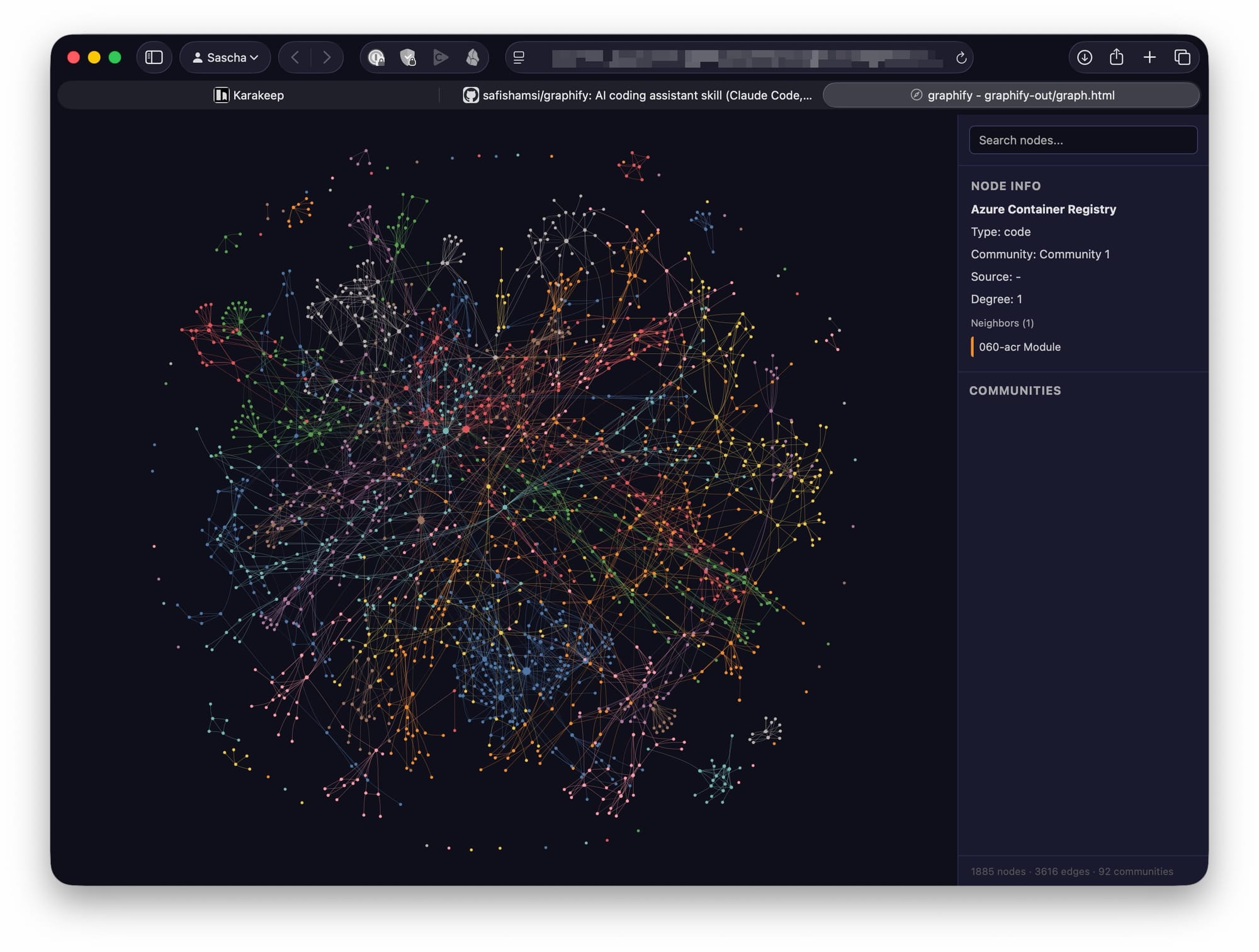
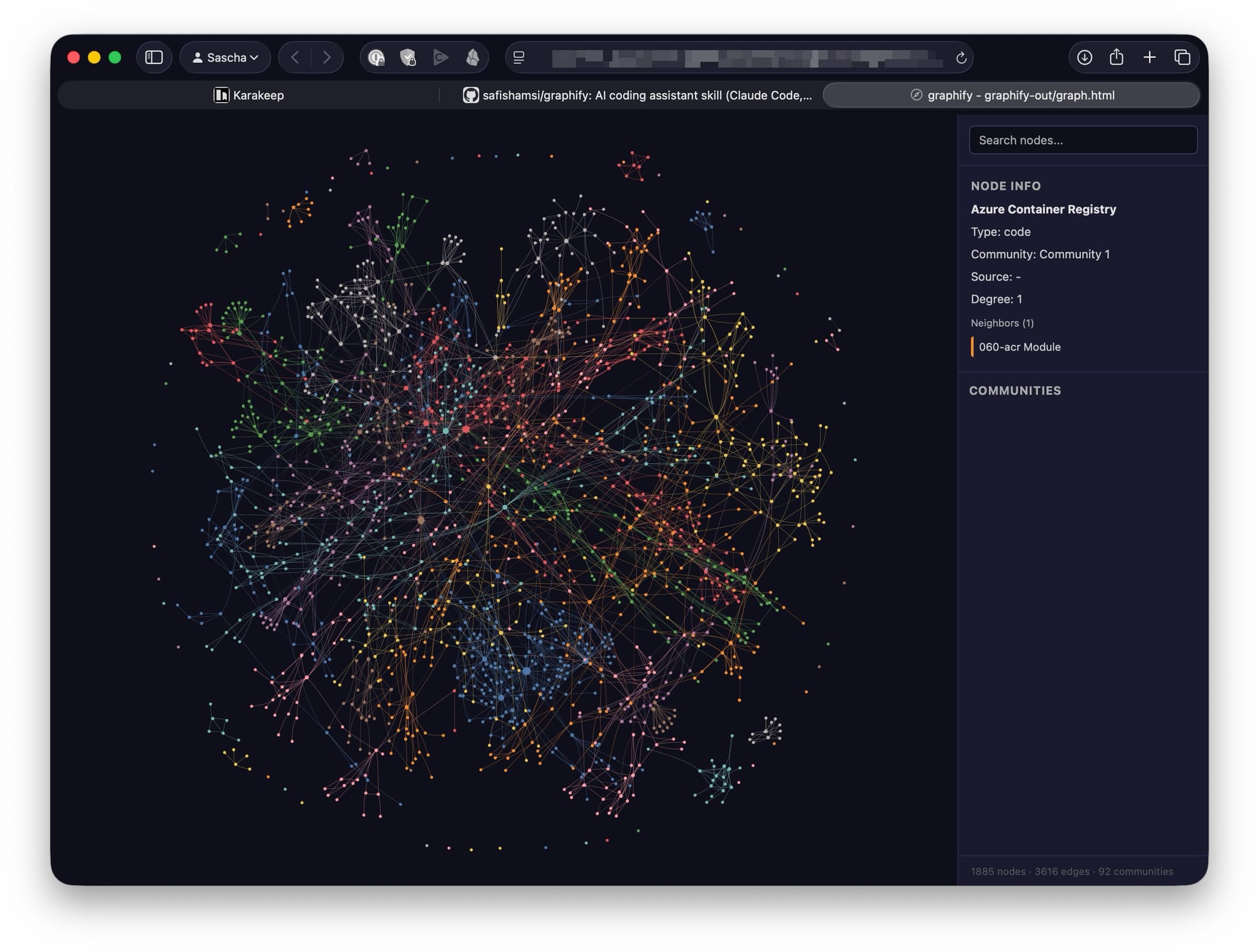
This is where Graphify becomes interesting. Graphify is an open-source AI coding assistant skill that turns a folder of code, documentation, papers, diagrams, images, audio, and video into a queryable knowledge graph for tools such as Claude Code, Codex, OpenCode, Cursor, Gemini CLI, GitHub Copilot CLI, VS Code Copilot Chat, Aider, and others. The repository describes it as a skill you can invoke with /graphify, after which it reads the project, builds a graph, and produces structure that helps an assistant understand both what exists and how it relates. (GitHub)
The Problem: AI Assistants Still See Code Mostly as Text
Most AI-assisted coding workflows are still file-centric. The assistant reads a few files, searches for symbols, inspects snippets, and constructs a temporary mental model inside the context window. That model disappears after the session unless you manually encode it into documentation, memory files, or project instructions.
For a small repository, that is acceptable. For a real product codebase, it becomes expensive and lossy.
Large codebases are not just collections of files. They are networks:
- functions call other functions;
- classes implement protocols;
- services depend on shared abstractions;
- configuration controls runtime behavior;
- documentation explains intent;
- diagrams describe architecture;
- design notes explain trade-offs;
- tests encode expected behavior;
- comments sometimes contain the only explanation of why something exists.
A language model can infer some of that from text, but it has to repeatedly reconstruct the same context. Graphify’s value proposition is to make that structure explicit and persistent.
What Graphify Does
Graphify builds a knowledge graph from a project folder. It outputs artifacts such as:
graphify-out/
├── graph.html       # interactive graph visualization
├── GRAPH_REPORT.md  # human-readable report
├── graph.json       # persistent, queryable graph
└── cache/           # incremental cache
The graph can include nodes for files, functions, classes, concepts, documents, diagrams, rationale, and semantic relationships. Graphify’s README describes a three-stage approach: deterministic AST extraction for code, local transcription for video/audio via faster-whisper, and LLM-based semantic extraction for documents, papers, images, and transcripts. It then merges the results into a NetworkX graph, clusters it with Leiden community detection, and exports HTML, JSON, and a report. (GitHub)
That distinction matters. Graphify does not merely summarize a repository. It creates a navigable relationship model.
Why Knowledge Graphs Help Coding Assistants
A knowledge graph gives an AI assistant a structured representation of the system. Instead of asking the model to re-read the same raw files every time, the assistant can traverse relationships:
function A calls function Bclass X implements concept Ydocument Z explains design decision Ddiagram node N corresponds to service Scomponent P depends on package Qrationale R explains why module M behaves this way
This changes the interaction pattern. The assistant is no longer only searching for text matches. It can reason over connected entities.
That is important because many engineering questions are not keyword-search questions. They are topology questions.
For example:
Which components are affected if I change this interface?
A text search may find references. A graph can expose dependency paths.
Where is this concept implemented?
A vector search may retrieve similar documents. A graph can connect concepts from design docs to concrete source files.
Why does this module exist?
A grep-based workflow may find comments. A graph can link rationale comments, design notes, related tests, and implementation nodes.
The Big Benefit: Persistent Context
One of the most frustrating aspects of AI-assisted engineering is context evaporation. You explain the architecture once, the assistant helps for a while, and then the useful mental model is gone. You can mitigate that with CLAUDE.md, .github/copilot-instructions.md, .cursorrules, design docs, or memory files, but those are usually manually maintained and rarely complete.
Graphify creates a persistent graph artifact. According to the repository, the graph.json output can be queried later without re-reading the raw files, and the cache uses SHA-256 so re-runs only process changed files. (GitHub)
That makes it useful as a project memory layer for AI coding assistants.
The first run is the expensive one. After that, the graph becomes reusable context. This is especially valuable for:
- onboarding into unfamiliar repositories;
- switching between branches;
- reviewing architectural impact;
- investigating legacy code;
- preparing refactorings;
- connecting code to documentation;
- supporting agentic coding workflows where the assistant needs stable project context.
Beyond Code: Multi-Modal Engineering Context
Modern software systems are not described only in source files. Important knowledge often lives in:
- Markdown architecture documents
- PDFs
- screenshots
- diagrams
- whiteboard photos
- design meeting recordings
- research papers
- API docs
- inline comments
- issue discussions
- notebooks
- generated reports
Graphify explicitly targets this broader engineering corpus. The GitHub README says it can process code, PDFs, Markdown, screenshots, diagrams, images in other languages, and video/audio files, connecting extracted concepts and relationships into one graph. It also supports 25 programming languages via Tree-sitter AST extraction. (GitHub)
That is a meaningful extension over classic “AI over code” workflows. The most valuable engineering context is often outside the codebase, or only partially reflected in it. A knowledge graph can connect those external artifacts back to implementation.
For example:
architecture.pdf  ──describes──>  event-driven ingestion
event-driven ingestion  ──implemented_by──>  IngestionWorker
IngestionWorker  ──calls──>  MessageDeduplicator
MessageDeduplicator  ──tested_by──>  DeduplicationTests
That is far more useful than a flat list of files.
Making the “Why” Queryable
A major weakness of coding assistants is that they are usually better at explaining what code does than why it was written that way.
Graphify addresses this directly. Its README says it extracts design rationale from docstrings, inline comments such as NOTE, IMPORTANT, HACK, and WHY, and design documents into rationale_for nodes. The goal is not just to describe implementation mechanics, but to preserve the intent behind them. (GitHub)
That is extremely valuable for senior engineering work.
In real systems, the risky part of a change is not editing code. The risky part is violating an implicit constraint:
- a retry exists because a downstream service is eventually consistent;
- a timeout is unusually high because a legacy dependency is slow;
- a cache is deliberately not invalidated immediately because read-your-writes is not required;
- an abstraction exists because multiple deployment targets share the same pipeline;
- a strange data shape exists because an external customer integration depends on it.
When this rationale is not represented structurally, an AI assistant may “clean up” code that should not be cleaned up. A graph that links implementation to rationale gives the assistant a better chance of preserving important design constraints.
Better Refactoring Support
Refactoring is where knowledge graphs can become particularly powerful.
Traditional AI coding assistants can suggest local edits. They can also perform multi-file changes if given enough context. But safe refactoring requires understanding dependency structure, semantic coupling, and design intent.
Graphify can help by surfacing:
- high-degree “god nodes” that many parts of the system depend on;
- communities of related code;
- surprising cross-domain relationships;
- inferred semantic links;
- dependency paths;
- concept-to-code mappings.
The Graphify site describes “god nodes” as high-degree concepts at the center of the system and “surprising connections” as unexpected cross-file or cross-domain connections worth investigating. (Graphify)
That can help engineers ask better questions before letting an AI assistant modify code:
/graphify explain PaymentAuthorizationService
/graphify path UserSession TokenValidator
/graphify query "What depends on the retry policy?"
/graphify query "Which documents explain the ingestion architecture?"
Used this way, Graphify becomes a planning tool before code generation. That fits well with a disciplined AI-assisted engineering workflow: analyze, plan, implement one small change, run tests, review carefully, then continue.
Token Efficiency and Cost
Graphify also positions itself as a token-efficiency tool. The README claims a benchmark of 71.5× fewer tokens per query on a mixed corpus consisting of Karpathy repositories, papers, and images, compared with reading the raw files. It also notes that the advantage compounds after the first run because subsequent queries read the compact graph rather than the original corpus. (GitHub)
That number should be treated as a project-provided benchmark, not as a universal guarantee. The same README shows smaller gains for small corpora, including an approximately 1× reduction for a small synthetic Python library, while noting that graph value there is more about structural clarity than compression. (GitHub)
That is the right way to think about it:
- for small repositories, Graphify helps with structure;
- for large mixed corpora, it may also substantially reduce repeated context cost;
- for long-lived projects, the value increases as the graph becomes a reusable memory layer.
Local-First, But Not Fully Offline
Graphify’s privacy model is also worth understanding precisely.
According to the README, code files are processed locally through Tree-sitter AST extraction, and video/audio transcription runs locally through faster-whisper. However, semantic extraction for documents, papers, and images uses the underlying model API configured by the AI coding assistant, such as Anthropic, OpenAI, or another provider. The project states that it performs no telemetry, usage tracking, or analytics, and that the only network calls are to the model API during extraction. (GitHub)
The Graphify site similarly says it does not bundle an LLM and uses the model API key already configured by the assistant. It also says raw source code is not sent to the upstream model, while semantic content is used for extraction. (Graphify)
For enterprise use, that distinction matters. Graphify may be appropriate for many internal projects, but you should still review:
- which files are included;
- what document content is sent to model APIs;
- whether
.graphifyignoreexcludes sensitive material; - whether your organization permits the configured AI provider;
- whether generated graph artifacts may contain sensitive design information;
- how graph outputs are stored and shared.
The .graphifyignore support is important here. You can exclude folders such as vendor/, node_modules/, dist/, generated files, secrets, test fixtures, or customer-specific material before graph construction. (GitHub)
How This Fits into an AI-Assisted Engineering Workflow
Graphify is not a replacement for a coding assistant. It is a context amplifier.
A practical workflow could look like this:
uv tool install graphifyy
# or pipx install graphifyy
# or pip install graphifyy
graphify install # for Claude Code
graphify vscode install # for VS Code & GitHub Copilot
/graphify .
Then inspect the outputs:
graphify-out/GRAPH_REPORT.md
graphify-out/graph.html
graphify-out/graph.json
From there, use the graph before asking the assistant to implement changes:
/graphify query "What are the central concepts in this repository?"
/graphify query "Which modules are involved in authentication?"
/graphify explain "OrderProcessor"
/graphify path "CheckoutController" "PaymentGateway"
Then move into implementation:
Use the graph context to identify the smallest safe change.
Create a plan.
Modify only the affected files.
Run the relevant tests.
Explain which graph relationships were affected.
This is where Graphify becomes powerful. It can make the assistant less reactive and more architectural.
Where Graphify Is Especially Useful
Graphify is likely most useful in repositories where code is only part of the knowledge base.
Good candidates include:
- platform engineering repositories with many services
- AI and data systems with papers, notebooks, and diagrams
- legacy applications with sparse documentation
- SDKs with complex examples and generated code
- infrastructure-as-code repositories
- agent frameworks
- research-to-product projects
- multi-language systems
- codebases with many design documents
- onboarding-heavy enterprise projects
It is less compelling for very small projects where the entire codebase fits comfortably into an assistant’s context window. Even there, however, the graph may still help by showing structure, communities, and unexpected relationships.
Why This Matters for the Future of AI Coding
The next stage of AI-assisted engineering is not just better autocomplete. It is better context engineering.
Today’s assistants are strongest when the developer already knows what to do. They accelerate known tasks. But engineering also includes exploration: understanding an unfamiliar system, finding hidden dependencies, validating assumptions, and reasoning about architectural consequences.
Knowledge graphs help bridge that gap because they encode relationships explicitly. They give the assistant something closer to a system map.
That does not eliminate the need for human review. In fact, it makes review more important. Graphify marks relationships as EXTRACTED, INFERRED, or AMBIGUOUS, and inferred edges can carry confidence scores. (GitHub) That is exactly the kind of transparency engineers need. The graph should not be treated as truth. It should be treated as a structured hypothesis about the system, grounded in code and artifacts, but still reviewable.
Recommended Adoption Pattern
I would not introduce Graphify by immediately wiring it into every repository. I would start with one non-trivial codebase and use it for architectural exploration.
A sensible adoption path:
- Run Graphify on a representative repository.
- Exclude noisy or sensitive folders with
.graphifyignore. - Review
GRAPH_REPORT.md. - Open
graph.htmland inspect central nodes and communities. - Ask your assistant graph-based questions before making changes.
- Compare the assistant’s answers against your own understanding.
- Add graph refresh to the workflow only after trust is established.
Graphify also supports automatic updates through watch mode and Git hooks, according to the README. The Git hook integration can rebuild the graph after commits and branch switches, surfacing failures instead of silently continuing. (GitHub)
For serious use, that is the right direction: keep the graph close to the evolving codebase.
The Bigger Picture
Graphify represents an important pattern: AI coding assistants need durable, structured project memory.
Prompt files, embeddings, grep, and context windows are useful, but they are not enough. Software systems are graphs: dependency graphs, call graphs, concept graphs, ownership graphs, data-flow graphs, and decision graphs. Making those graphs explicit gives AI assistants a better substrate for reasoning.
The most interesting part is not the visualization. It is the shift in workflow:
from: "read these files and guess what matters"
to:   "traverse this system map and explain the relationships"
That is a major improvement.
Conclusion
Graphify is worth paying attention to because it addresses one of the hardest practical problems in AI-assisted software engineering: maintaining useful context across large, messy, multi-modal codebases.
It gives coding assistants a persistent knowledge layer. It connects code to documentation and design rationale. It can reduce repeated context loading for large corpora. It exposes central concepts, surprising relationships, and graph communities. Most importantly, it encourages a more architectural way of working with AI assistants.
Used well, Graphify is not just another developer tool. It is a bridge between code generation and code understanding.
And that bridge is exactly where AI-assisted engineering needs to go next.