
HVE Core for VS Code: Turning GitHub Copilot into a Structured Engineering System. A Practical Guide


AI-assisted engineering becomes much more valuable when it is constrained by process, standards, and reusable workflows. That is exactly where HVE Core for VS Code stands out.
Rather than treating GitHub Copilot as a generic chat assistant or code completion engine, Hypervelocity Engineering (HVE) Core turns it into a more structured engineering environment built around specialized agents, auto-applied instructions, reusable prompts, and validated skills. Microsoft describes it as a way to transform Copilot into a constraint-based engineering workflow that can scale from individual developers to enterprise teams. (GitHub)
For teams doing serious AI-assisted engineering, that difference matters. The real productivity gains do not come from asking AI to “write some code.” They come from making AI operate inside a repeatable system for research, planning, implementation, review, and user-centered problem discovery. HVE Core is designed for exactly that.
What HVE Core Actually Is
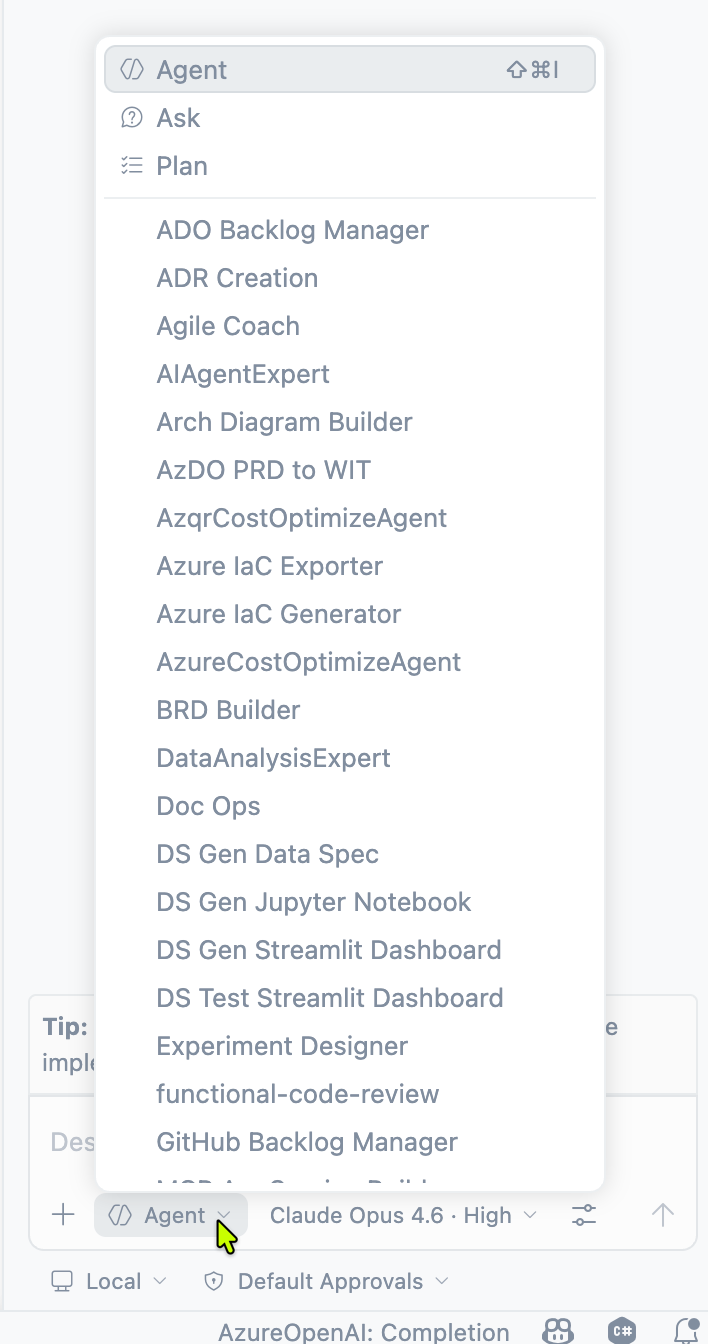
HVE Core is a VS Code extension ecosystem for GitHub Copilot. Once installed, its artifacts become available directly inside Copilot Chat. The quick start is intentionally simple: install the extension, open a project, launch Copilot Chat, select an agent such as rpi-agent, task-researcher, or memory, and start working. The agents, prompts, and instructions activate automatically after installation.
Under the hood, HVE Core organizes AI behavior into a four-tier artifact model:
- Prompts act as workflow entry points and translate user requests into structured execution.
- Agents orchestrate workflows.
- Instructions encode coding and documentation standards that are applied automatically.
- Skills provide executable utilities and packaged guidance. (GitHub)
That architecture is one of the biggest reasons HVE Core is interesting for engineering teams. It separates concerns cleanly. You are not just prompting a model. You are routing work through reusable workflow components.
Why HVE Core Is Useful for AI-Assisted Engineering
The first advantage is structure.
Most teams experimenting with AI coding assistants quickly run into the same issue: results vary based on who asks, how they ask, and how much context they remember to provide. HVE Core addresses that by packaging workflow knowledge into reusable artifacts instead of relying entirely on ad hoc prompting. Its instructions are applied automatically for matching file types, and its agents guide users through repeatable workflows rather than one-off conversations.
The second advantage is workflow orchestration.
HVE Core is not just a pile of prompts. The project ships with a substantial catalog of artifacts, including dozens of agents, instructions, prompts, and skills. The flagship hve-core collection is centered on the RPI workflow: Research, Plan, Implement, Review. That makes it especially well suited for non-trivial engineering work where jumping straight into code is usually the wrong move.
The third advantage is consistency across environments.
The VS Code extension approach has practical benefits: zero configuration, automatic updates, no repository pollution, and support across local environments, devcontainers, and Codespaces. For individual developers or teams who want fast adoption, this lowers the barrier significantly. The trade-off is that the extension method is intentionally less customizable and does not support version pinning in the same way as more manual installation models. (GitHub)
The fourth advantage is traceable workflow state.
HVE Core agents create workflow artifacts in a .copilot-tracking/ folder, which means work is not trapped inside ephemeral chat context. That matters in real engineering: you need resumability, state, and handoff points. Even the docs call out that this folder should be added to .gitignore when using the extension.
Why This Is Better Than Plain “Ask Copilot to Code”
Without structure, AI assistance often collapses into one of two bad patterns:
Either the model generates code too early, before the team really understands the problem, or it produces plausible but weak output because it lacks the standards and process context needed for the repository.
HVE Core addresses both problems.
Its artifact hierarchy helps teams encode standards once and reuse them across sessions. Its RPI workflow encourages staged execution instead of immediate implementation. And its design-thinking artifacts extend the system upstream into discovery, which is where many software failures really begin.
In other words, HVE Core is valuable because it shifts AI from answer generation to engineering workflow execution.
The Design-Thinking Angle: Why It Matters
One of the most compelling parts of HVE Core is that it does not assume implementation is the starting point.
The design-thinking documentation frames the core problem very clearly: many projects fail not because the code is wrong, but because the team solved the wrong problem. HVE Core includes a Design Thinking Guide and a DT Coach agent to address that. The framework uses nine methods across three spaces:
- Problem Space: scope conversations, design research, input synthesis
- Solution Space: brainstorming, user concepts, low-fidelity prototypes
- Validation Space: high-fidelity prototypes, user testing, iteration at scale (GitHub)
This is highly relevant for AI-assisted engineering because AI is very good at accelerating execution, but it can just as easily accelerate execution of the wrong thing. Design thinking slows the team down at the right moment: before implementation commitment.
The DT Coach is specifically intended for projects with unclear requirements, multiple stakeholders, cross-organizational complexity, strong user adoption requirements, or situations where early prototyping can prevent costly rework. It works with a Think / Speak / Empower philosophy, manages session state, enforces fidelity appropriate to each design-thinking space, and prepares handoff artifacts for the downstream RPI workflow. (GitHub)
That is a strong pattern. Instead of forcing developers to choose between “human-centered discovery” and “engineering throughput,” HVE Core connects them.
How Design Thinking Connects to Delivery
The handoff from design thinking into engineering is not loose or informal. HVE Core explicitly connects DT sessions to RPI through structured handoff artifacts.
When a DT session reaches a natural exit point, the DT Coach prepares artifacts containing validated findings, confidence markers such as validated, assumed, unknown, and conflicting, plus stakeholder maps. Those artifacts are then consumed by RPI agents such as Task Researcher, which can pass work downstream to Task Planner and Task Implementor. (GitHub)
This is one of the strongest ideas in the whole system.
It means the transition from discovery to delivery is not a hand-wavy summary in a Teams chat or a forgotten whiteboard photo. It is a machine-readable, workflow-aware handoff with explicit uncertainty markers and stakeholder context. That improves planning quality, constrains implementation scope, and reduces the risk of false certainty.
A Practical Way to Use HVE Core Effectively
The best way to use HVE Core is not to start with implementation.
A practical pattern looks like this:
1. Start with the right entry point
If the problem is already clear and mostly technical, begin with an RPI-oriented agent such as task-researcher or task-planner. If the request is fuzzy, stakeholder-heavy, or suspiciously solution-led, start with DT Coach instead. HVE Core’s own documentation positions DT Coach for unclear requirements and multi-stakeholder discovery.
2. Let the agent challenge the framing
The DT Coach example in the docs is telling: when a user says they were asked to build a real-time dashboard, the coach responds by identifying that this is a proposed solution rather than a validated problem and redirects the conversation toward what actually happens today. That is exactly the kind of intervention teams need more often.
3. Preserve state and artifacts
DT Coach stores its session state under .copilot-tracking/dt/{project-slug}/, including a coaching-state.md file and per-method artifacts. This lets you pause and resume sessions instead of losing the thread every time context resets.
4. Use RPI only after confidence is high enough
Once the problem statement, concept, or implementation spec is mature enough, hand off to the RPI flow. HVE Core supports multiple exit points from design thinking into Task Researcher depending on how far validation has progressed.
5. Keep fidelity appropriate to the stage
One subtle but important point in the docs is that each space has its own quality standard: rough in Problem Space, scrappy in Solution Space, and functional in Validation Space. That is important because teams often polish too early. HVE Core explicitly discourages premature polish during low-fidelity ideation and carries that fidelity awareness into implementation and review.
Short Guide: How to Use HVE Core Well in VS Code
Here is a compact workflow that works well in practice.
Installation and startup
Install the HVE Core extension from the VS Code Marketplace. I recommend installing the "HVE Core - All" extension.

Open your project, open GitHub Copilot Chat withCtrl+Alt+I, and select an appropriate agent. HVE Core artifacts become available immediately after installation.
For straightforward engineering work
Use an RPI-style path:
- Start with
task-researcherto clarify technical constraints. - Move to planning before code generation.
- Implement only after the research and planning artifacts are strong enough.
- Use review-oriented prompts and agents before finalizing changes. (GitHub)
For ambiguous or stakeholder-heavy work
Use a DT-first path:
- Select DT Coach in Copilot Chat.
- Describe the problem area, not the desired feature.
- Let the coach guide you through the next appropriate design-thinking method.
- Use
/dt-method-nextwhen you want the system to assess the correct next step. - Resume later from the persisted coaching state if needed.
- Hand off to RPI once you have a validated problem statement, concept, or implementation specification. (GitHub)
Operational tips
Add .copilot-tracking/ to .gitignore, since HVE Core stores workflow artifacts there. Also be aware that the extension method is optimized for convenience and automatic updates, but is less suitable when you need deep customization or strict version control across a team. (GitHub)
The Real Advantage of Design Thinking in AI-Assisted Engineering
The advantage of design thinking is not that it is “creative.” It is that it improves problem quality before AI amplifies execution speed.
In AI-assisted engineering, the main risk is not slow implementation anymore. The main risk is high-speed misexecution.
Design thinking counters that by forcing teams to separate problem discovery from solution commitment. It also helps expose stakeholder differences, assumptions, unknowns, and conflicting signals before these become architectural debt or product churn. HVE Core strengthens this further by making those outputs operationally useful for downstream engineering agents rather than leaving them as workshop artifacts. (GitHub)
That is why the combination is powerful: design thinking improves the inputs, and HVE Core improves the execution system.
Final Thoughts
HVE Core is interesting because it treats AI assistance as an engineering system, not a clever chatbot add-on.
Its combination of agents, prompts, instructions, and skills provides structure. Its RPI workflow supports disciplined delivery. Its design-thinking assets and DT Coach extend the workflow upstream into user-centered discovery. And its handoff model creates a real bridge between validated problem understanding and implementation. (GitHub)
For teams using GitHub Copilot in VS Code, that makes HVE Core more than a productivity tool. It is a framework for making AI-assisted engineering more deliberate, more repeatable, and less likely to optimize the wrong thing.