
Shoot, Frame, Done: In-App Camera Capture in PictureFramer 1.4

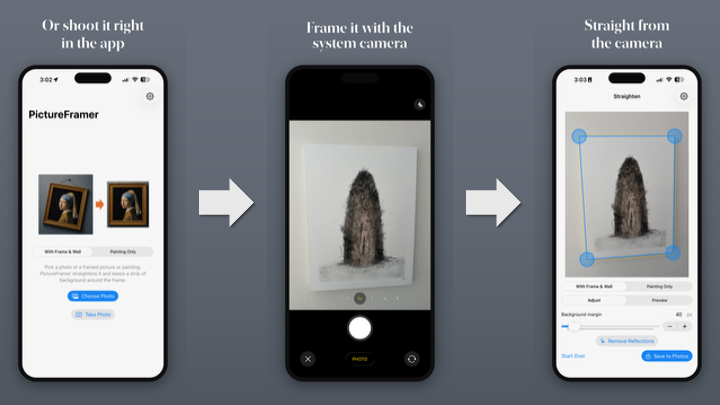
Until now, digitizing a framed painting with PictureFramer meant a three-app dance: open Camera, shoot the picture, switch to Photos to check it, then open PictureFramer and re-find the shot in the picker. Version 1.4.0 collapses that into one flow: tap Take Photo inside the app, shoot, and land directly in the editor with the artwork already detected and perspective-corrected.
This post walks through how the feature is built — and why the interesting part is how little code it took.
The user-facing change
On the picker screen there is now a Take Photo button next to the familiar Choose Photo one. It opens the standard iOS camera UI — shutter, flash control, and the retake/use-photo confirmation you already know. The moment you tap Use Photo, PictureFramer's pipeline takes over: Vision detects the outer edge of the frame, Core Image straightens the perspective, and you're in the editor adjusting corners and margin, exactly as if you had picked the shot from your library.
One deliberate difference from shooting with the Camera app: the raw capture is never saved. The skewed, uncorrected original exists only in memory. The only image that ever reaches your photo library is the final, straightened export — no cluttering your camera roll with throwaway shots taken at an angle.
Design constraint: the pipeline must not care
PictureFramer's core (Sources/Core/) is a UI-free, fully unit-tested pipeline: detect → margin → correct. Its input is a CGImage in a canonical coordinate space; it has no idea whether the pixels came from the photo library, and it shouldn't start caring now.
So the design goal was: zero changes to Sources/Core/. The camera is just another source of bytes.
The one refactor that made this true lives in the view model. Loading a library photo used to be a single method that did two jobs: resolve the PhotosPickerItem to Data, then decode, downscale, and run detection. Splitting it gave us a shared funnel:
/// Shared load funnel for both photo-picker and camera captures.
func load(data: Data) async {
    stage = .loading
    errorMessage = nil
    guard let image = Self.normalizedCGImage(from: data) else {
        errorMessage = "Couldn't load that photo."
        stage = .picking
        return
    }
    sourceImage = image
    let base = await Task.detached(priority: .userInitiated) {
        downscaled(image, maxDimension: 1600)
    }.value
    previewBase = base
    previewScale = CGFloat(base.width) / CGFloat(image.width)
    await runDetection()
}
load(item:) (the photo-picker path) is now a thin wrapper that resolves the picker item to Data and calls load(data:). The camera path calls load(data:) directly. Both sources converge before any real work happens, so every downstream behavior — detection, error handling, stage transitions — is shared and tested once.
The camera wrapper: dumb glue on purpose
We considered a custom AVCaptureSession viewfinder with a live Vision rectangle overlay — see the frame outlined in real time, shoot when it locks on. Tempting, and explicitly rejected. It would mean hundreds of lines of session management, preview-layer coordinate math, and a second rectangle-detection code path to keep in sync with the real one. The system camera UI already does everything the flow needs.
So CameraPicker is a UIViewControllerRepresentable wrapping plain UIImagePickerController, and it is intentionally logic-free:
func imagePickerController(
    _ picker: UIImagePickerController,
    didFinishPickingMediaWithInfo info: [UIImagePickerController.InfoKey: Any]
) {
    // 0.95 keeps the EXIF orientation tag and near-lossless pixels;
    // normalizedCGImage(from:) bakes the orientation in downstream.
    if let image = info[.originalImage] as? UIImage,
       let data = image.jpegData(compressionQuality: 0.95) {
        parent.onCapture(data)
    }
    parent.dismiss()
}
That's essentially the whole file: read the confirmed capture, encode it as near-lossless JPEG, hand the bytes to a callback, dismiss. Cancel just dismisses. Because there is no logic here, there is nothing here that needs unit tests — a property we wanted, not an accident (more below).
Two presentation details worth knowing if you build something similar:
- The camera is presented via
fullScreenCover, not a sheet. Sheet-presented camera pickers are known-glitchy (broken layout, dead shutter on some iOS versions). - The button only renders when
UIImagePickerController.isSourceTypeAvailable(.camera)is true — so it disappears automatically in the simulator instead of crashing on tap.
Orientation: the bug that never happened
Camera captures are the classic source of EXIF-orientation bugs — shoot in portrait, get a sideways image, start sprinkling rotation fixes through the pipeline. PictureFramer's architecture made this a non-event.
The app's load-bearing invariant is that its canonical coordinate space (full-resolution source pixels, lower-left origin) never sees orientation: normalizedCGImage(from:) bakes the EXIF orientation into the pixels at decode time, before anything else runs. The camera path feeds JPEG data — with its orientation tag preserved by jpegData(compressionQuality:) — into that same decoder. Portrait, landscape, upside-down: handled with zero new code, because the invariant was already paying rent.
Permissions
Unlike the photo picker (which runs out-of-process and needs no permission string), the camera requires NSCameraUsageDescription and runtime authorization. The flow checks AVCaptureDevice.authorizationStatus(for: .video) on tap:
.denied/.restricted→ don't present the camera; show an inline error with a link to the app's Settings page, mirroring the existing pattern for photo-library export denial.- Anything else → present; iOS shows its own permission prompt on first use.
Testing where the logic lives
The test strategy follows directly from the "dumb glue" split:
- Unit tests (Swift Testing) drive
load(data:)directly — no camera, no picker. A JPEG-encoded fixture image (drawn headlessly into aCGBitmapContext, no bundled assets) must reach the adjusting stage with a detected quad; garbage bytes must produce the "Couldn't load that photo." error and return to the picker. Since both input sources funnel through this method, these tests cover the camera path's entire logic. - The wrapper is not unit tested. It contains no branches worth testing, by design.
- No XCUITest for the capture flow — the simulator has no camera, full stop. The end-to-end flow was verified manually on hardware via TestFlight.
Pushing all logic into a testable, source-agnostic method and keeping the UIKit adapter logic-free is the whole trick. When the untestable part has nothing in it, "we can't test the camera in CI" stops being a coverage hole.
Takeaways
- New input source ≠ new pipeline. Converge sources on a shared funnel (
load(data:)) as early as possible; everything downstream stays written and tested once. - The system camera UI is usually enough. A custom
AVCaptureSessionviewfinder is a big maintenance surface; reach for it only when you truly need live overlays. - Make the untestable layer logic-free, then don't test it. Test the funnel it feeds instead.
- Bake EXIF orientation in at decode time, once, and orientation bugs stop existing as a category.
The net cost of the feature: one 65-line wrapper, a ~30-line view-model refactor, a button, and a permission string. PictureFramer 1.4.0 is live now.