
Perplexity Bumblebee: Fast, Read-Only Supply-Chain Exposure Checks for Developer Machines

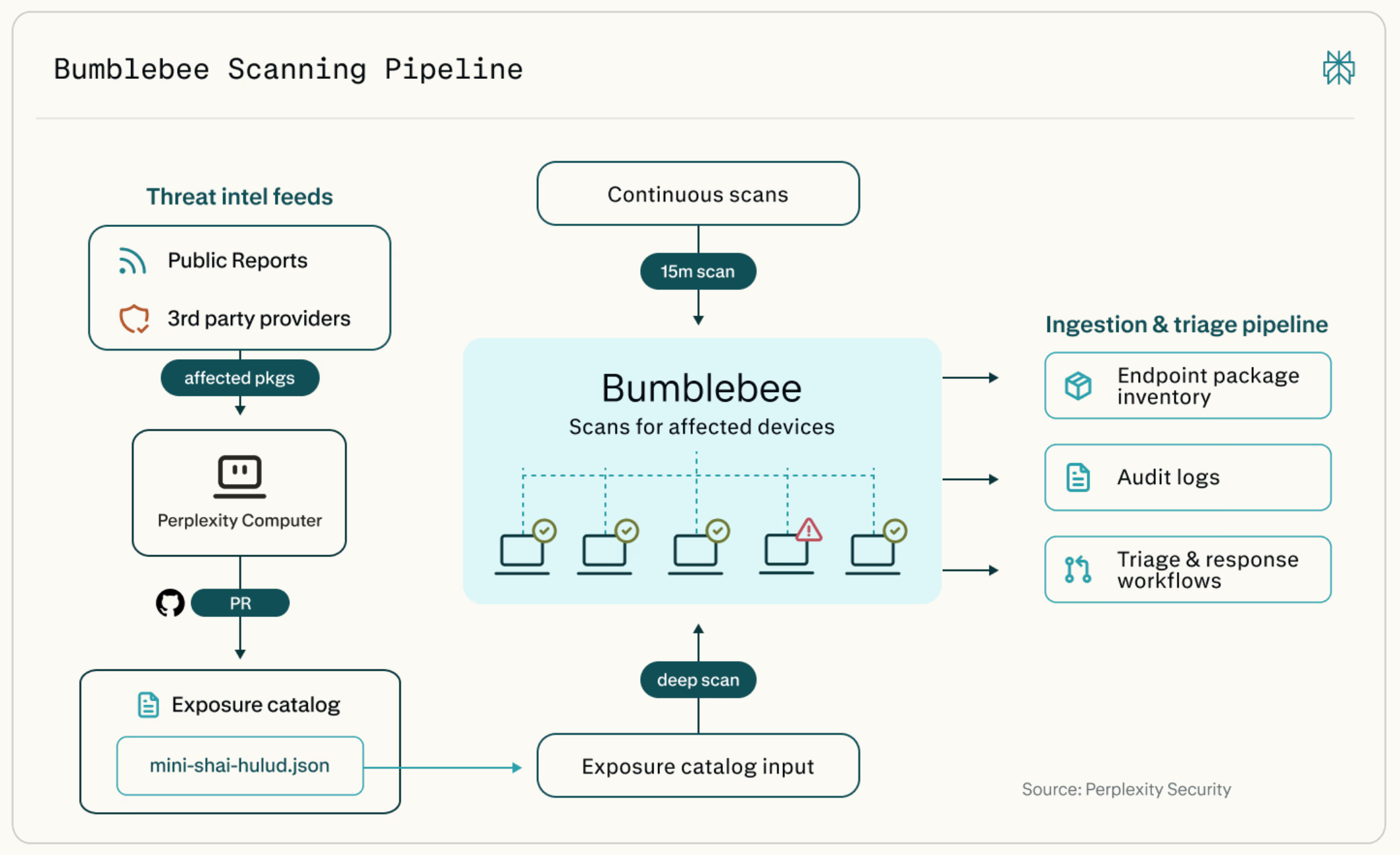
Modern software supply-chain incidents move fast. A malicious package version is published, copied into lockfiles, installed into developer environments, embedded into project workspaces, or exposed through editor and browser extensions. The immediate security question is rarely theoretical:
Which developer machines are exposed right now?
That is the problem Perplexity Bumblebee is designed to answer.
Bumblebee is an open-source, read-only scanner for macOS and Linux developer endpoints. It inventories package, extension, and developer-tool metadata already present on disk and optionally compares that inventory against an exposure catalog of known risky packages or versions.
Its goal is not to replace SBOMs, EDR, dependency scanners, or vulnerability management platforms. Its goal is narrower and operationally very useful: when a supply-chain advisory names a package, extension, ecosystem, or version, Bumblebee helps determine whether that artifact appears on developer machines.
That makes it especially relevant for engineering organizations dealing with npm, PyPI, Go, RubyGems, Composer, Homebrew, browser extensions, VS Code-style extensions, and increasingly AI developer-tool configuration such as MCP server definitions.
Why Bumblebee Exists
Traditional security tooling gives partial answers to supply-chain questions.
An SBOM tells you what shipped in a product. That is essential, but it does not necessarily describe the messy, transient state of developer workstations. Endpoint detection and response tooling can show process execution, network activity, and file events, but it may not give a clean package-level inventory across every local project, language toolchain, editor extension, and browser profile.
Developer machines are different. They often contain:
- multiple cloned repositories
- stale worktrees
- experimental branches
- language-specific caches
- local virtual environments
- global package manager state
- editor extensions
- browser extensions
- AI coding assistant configuration
- MCP server definitions
- tools installed outside corporate golden images
When a malicious version of a package is discovered, you need to know whether that version appears anywhere in that local developer state. Bumblebee focuses exactly on that scenario.
What Bumblebee Does
Bumblebee scans on-disk metadata and emits structured records. It does not execute package managers such as npm ls, pip show, go list, or brew list. It reads known metadata files directly, extracts package or extension identity information, and writes the result as newline-delimited JSON.
At a high level, it can do two things:
- Inventory mode
Produce structured package, extension, and tool metadata from a developer endpoint. - Exposure-check mode
Compare that inventory against a JSON exposure catalog and emit findings for exact matches.
The important design point is that Bumblebee is read-only. It does not install packages, resolve dependencies, modify lockfiles, execute build scripts, or run package manager commands. That makes it suitable for fast endpoint checks where the organization wants low operational risk and repeatable output.
What Bumblebee Scans
Bumblebee covers several important developer surfaces.
For JavaScript and TypeScript ecosystems, it reads npm, pnpm, Yarn, and Bun metadata. It can inspect files such as:
package-lock.jsonnpm-shrinkwrap.jsonpnpm-lock.yamlyarn.lock- text-format
bun.lock - selected
node_modulespackage metadata
For Python, it reads installed package metadata such as:
*.dist-info/METADATAINSTALLERdirect_url.json- legacy
*.egg-info/PKG-INFOfiles
For Go, it reads go.sum and go.mod. This matters because Go module caches on developer machines can contain many versions fetched over time, not only what is currently built by a specific project.
For Ruby, it reads Gemfile.lock and installed gemspec metadata.
For PHP Composer, it reads composer.lock and Composer’s installed package metadata.
For Homebrew, it reads install receipt and cask metadata rather than invoking Homebrew commands.
For editors, it inventories extension manifests from VS Code, Cursor, Windsurf, and VSCodium-style extension locations.
For browsers, it can inspect Chromium-family and Firefox extension metadata.
For AI developer tooling, it reads supported JSON-based MCP configuration files, including common files used by Claude Desktop, Claude Code, Gemini CLI / Code Assist, Cline, and related tooling. This is an especially interesting addition because MCP servers and AI tool configuration have become part of the modern developer attack surface.
The Core Concept: Exposure Catalogs
Bumblebee becomes most useful when paired with an exposure catalog.
An exposure catalog is a JSON file that describes artifacts of concern: ecosystem, package name, version, severity, and advisory metadata. Bumblebee compares the scanned local inventory against that catalog and emits findings for exact matches.
A minimal catalog entry looks conceptually like this:
{
  "schema_version": "0.1.0",
  "entries": [
    {
      "id": "advisory-2026-0042",
      "name": "example-pkg 1.2.3 compromised release",
      "ecosystem": "npm",
      "package": "example-pkg",
      "versions": ["1.2.3"],
      "severity": "critical"
    }
  ]
}
This is intentionally simple. Bumblebee is not trying to infer complex vulnerability ranges or perform deep semantic dependency analysis. It checks whether a known-bad artifact appears in local endpoint metadata.
That exact-match behavior is both a strength and a limitation. It keeps the scanner deterministic and easy to reason about, but it also means the quality of the result depends heavily on the quality and freshness of the catalog.
Scan Profiles
Bumblebee has three scan profiles:
baselineprojectdeep
The baseline profile is meant for common global and user-level developer state. It looks at common package roots, language toolchains, editor extensions, browser extensions, Homebrew metadata, and supported MCP config locations. This is useful for recurring lightweight inventory.
The project profile scans configured development directories such as ~/code, ~/src, ~/work, or explicitly supplied roots. This is useful when you want to scan known project workspaces without walking the entire home directory.
The deep profile is for explicit broad scans, usually during incident response. It requires explicit --root paths and is the profile you would use for an on-demand campaign such as scanning $HOME against a specific exposure catalog.
This split is practical. A lightweight recurring baseline scan and a heavy incident-response scan have very different operational profiles.
Installing Bumblebee
Bumblebee is written in Go and ships as a single static binary. The repository requires Go 1.25 or newer.
To install the latest tagged version:
go install github.com/perplexityai/bumblebee/cmd/bumblebee@latest
To pin a specific version:
go install github.com/perplexityai/bumblebee/cmd/bumblebee@v0.1.1
To build from a checkout:
git clone https://github.com/perplexityai/bumblebee.git
cd bumblebee

go build -o bumblebee ./cmd/bumblebee
go test ./...
You can verify the local build with:
bumblebee version
Bumblebee also includes a self-test:
bumblebee selftest
The self-test uses embedded fixtures with deliberately fake package names and makes no network calls. This is useful before rolling the tool out across a fleet.
Basic Usage
Run a baseline inventory scan:
bumblebee scan --profile baseline > inventory.ndjson
Scan specific project roots:
bumblebee scan --profile project \
  --root "$HOME/code" \
  --root "$HOME/Developer" \
  > project-inventory.ndjson
Limit scanning to selected ecosystems:
bumblebee scan --profile baseline \
  --ecosystem npm,pypi \
  --ecosystem go \
  > selected-inventory.ndjson
Preview the roots Bumblebee will scan:
bumblebee roots --profile baseline
Run a deep exposure scan against a catalog:
bumblebee scan --profile deep \
  --root "$HOME" \
  --exposure-catalog ./catalog.json \
  --max-duration 10m \
  > findings-and-inventory.ndjson
Emit only findings, not the full package inventory:
bumblebee scan --profile deep \
  --root "$HOME" \
  --exposure-catalog ./catalog.json \
  --findings-only \
  > findings.ndjson
Understanding the Output
Bumblebee writes newline-delimited JSON. This is a good operational format because it can be streamed, appended to log files, shipped through existing log pipelines, or posted to an ingestion endpoint.
A package record includes information such as:
{
  "record_type": "package",
  "scanner_name": "bumblebee",
  "ecosystem": "npm",
  "package_name": "@tanstack/query-core",
  "version": "5.59.20",
  "project_path": "/Users/alex/code/web-app",
  "package_manager": "pnpm",
  "source_type": "pnpm-lockfile",
  "source_file": "/Users/alex/code/web-app/pnpm-lock.yaml",
  "confidence": "high"
}
A finding record is emitted when a scanned component matches the exposure catalog:
{
  "record_type": "finding",
  "finding_type": "package_exposure",
  "severity": "critical",
  "catalog_id": "advisory-2026-0042",
  "ecosystem": "npm",
  "package_name": "example-pkg",
  "version": "1.2.3",
  "evidence": "exact name+version match (version=1.2.3)"
}
The confidence field is important. Bumblebee distinguishes between high-confidence records where identity and version come from canonical metadata, medium-confidence records where some metadata may be partial, and low-confidence records where the result is more of a reference than proof of an installed exact version.
Shipping Results
For local testing, writing to stdout is enough:
bumblebee scan --profile deep --root "$HOME" > inventory.ndjson
For endpoints with an existing log shipper, write to a local file:
bumblebee scan \
  --profile baseline \
  --output file \
  --output-file /var/log/bumblebee/inventory.ndjson \
  --append
For environments without an endpoint log pipeline, Bumblebee can POST NDJSON to an HTTP endpoint:
bumblebee scan \
  --profile deep \
  --root "$HOME" \
  --exposure-catalog ./catalog.json \
  --output http \
  --http-url https://inventory.example.com/v1/ingest \
  --http-auth bearer \
  --http-token-env BUMBLEBEE_TOKEN \
  --http-gzip \
  --device-id-env BUMBLEBEE_DEVICE_ID
The HTTP sink is deliberately simple. It sends NDJSON using Content-Type: application/x-ndjson, supports batching, supports gzip, and reads bearer tokens or HMAC keys from environment variables rather than command-line literals.
That last detail matters. Secrets on command lines can leak through process listings, shell history, or telemetry. Reading tokens from environment variables is a better default for endpoint automation.
Where Bumblebee Fits in a Security Program
Bumblebee is best viewed as an incident-response and exposure-verification tool for developer endpoints.
It complements SBOMs because SBOMs describe built or shipped artifacts, while Bumblebee checks local developer machine state.
It complements EDR because EDR focuses on runtime behavior and telemetry, while Bumblebee produces package and extension inventory from on-disk metadata.
It complements dependency scanners because dependency scanners typically run per repository or build pipeline, while Bumblebee can inspect broader local state across project folders, global toolchains, editor extensions, browser profiles, and AI tooling configuration.
A practical workflow could look like this:
- A new supply-chain compromise is published.
- The security team creates or updates an exposure catalog.
- Bumblebee is pushed to developer machines through MDM, SSH, a device-management tool, or an endpoint automation framework.
- Developer machines run
baseline,project, ordeepscans depending on the situation. - Findings are collected centrally.
- Security and engineering teams prioritize remediation for machines with exact matches.
- The organization updates its catalogs and reruns scans as new intelligence arrives.
This gives teams a fast answer to the urgent question: “Are we exposed?”
Advantages
The first major advantage is the read-only model. Bumblebee reads metadata; it does not execute package manager commands. That reduces the risk of triggering package lifecycle scripts, hitting registries, changing local state, or producing inconsistent results based on network availability.
The second advantage is speed and operational simplicity. A single Go binary with no non-standard-library dependencies is much easier to distribute across developer machines than a scanner with a large runtime or complex installation requirements.
The third advantage is coverage across developer-specific surfaces. Packages are only one part of the modern supply-chain problem. Editor extensions, browser extensions, Homebrew packages, and AI tool configuration all matter. Bumblebee’s inclusion of MCP configuration is particularly timely because AI assistants increasingly call local tools and remote services through MCP servers.
The fourth advantage is structured output. NDJSON is easy to ingest into SIEM systems, data lakes, log pipelines, and custom dashboards. The record model also supports deduplication and current-state tracking.
The fifth advantage is deterministic matching. Exact catalog matches are easy to explain. During an incident, that clarity matters. A finding can point to a source file, package name, version, ecosystem, and evidence string.
Problems and Limitations
Bumblebee is useful, but it is not magic.
The biggest limitation is that it depends on exposure catalogs. If the catalog is stale, incomplete, or wrong, Bumblebee will not find everything you care about. Catalog maintenance becomes part of the operational model.
The second limitation is exact matching. Exact name-and-version checks are excellent for known compromised artifacts but less suitable for broad vulnerability management where version ranges, transitive reachability, exploitability, or runtime context matter.
The third limitation is platform scope. Bumblebee targets macOS and Linux developer endpoints. Windows developer environments are not its current primary target.
The fourth limitation is source coverage. Bumblebee supports many ecosystems, but not everything. For example, some non-JSON AI-tool configurations are not parsed in the initial version, binary Bun lockfiles are not parsed, and some ecosystems or package managers may require future support.
The fifth limitation is that on-disk metadata is not the same as execution evidence. Bumblebee can tell you that a suspicious package version appears in local metadata. It does not prove that the package executed, exfiltrated data, or affected a production artifact.
The sixth limitation is operational preparation. To use Bumblebee effectively across an organization, you need a runner, a catalog update process, result ingestion, identity mapping, retention policy, and remediation workflow. The scanner is only one part of the response system.
The seventh limitation is privacy and data-handling sensitivity. Developer endpoint inventory can reveal usernames, hostnames, project paths, installed tools, editor extensions, and browser extension state. Organizations should treat the output as security-sensitive telemetry and avoid over-collection.
Practical Deployment Pattern
For an engineering organization, I would not start with a full deep scan of every developer home directory. I would start smaller.
First, run local tests on representative macOS and Linux developer machines:
bumblebee selftest
bumblebee roots --profile baseline
bumblebee scan --profile baseline > baseline.ndjson
Inspect the output and validate whether it contains acceptable fields for your security and privacy posture.
Second, test project scans on common workspace roots:
bumblebee scan --profile project \
  --root "$HOME/code" \
  --root "$HOME/work" \
  > project.ndjson
Third, create a small internal exposure catalog with fake package names and verify that findings are emitted correctly.
Fourth, decide how results should be shipped. If your endpoints already have a log shipper, file output is attractive. If not, the HTTP sink gives you a direct ingestion path.
Fifth, define scan cadence. A reasonable pattern could be:
baselinedaily or weeklyprojectdaily for known work directoriesdeeponly during incident responsedeep --findings-onlyfor high-urgency exposure campaigns
Sixth, build dashboards around findings, not raw inventory. Raw inventory is useful for investigation, but findings are what responders need first.
Example: Incident Response Workflow
Imagine a malicious npm package version is published and later disclosed. Security wants to know whether any developer machine contains that package version.
Create catalog.json:
{
  "schema_version": "0.1.0",
  "entries": [
    {
      "id": "npm-example-incident-001",
      "name": "example-package compromised release",
      "ecosystem": "npm",
      "package": "example-package",
      "versions": ["2.4.1"],
      "severity": "critical"
    }
  ]
}
Run a targeted deep scan:
bumblebee scan --profile deep \
  --root "$HOME" \
  --ecosystem npm \
  --exposure-catalog ./catalog.json \
  --findings-only \
  --max-duration 10m \
  > findings.ndjson
Review the findings:
jq 'select(.record_type == "finding")' findings.ndjson
Each finding should identify the endpoint, ecosystem, package, version, source file, and evidence. That is exactly the information needed to contact the developer, remove the dependency, clean local caches, rotate potentially exposed credentials if appropriate, and verify remediation.
Security Considerations
Bumblebee’s read-only design is a strong starting point, but teams should still treat deployment carefully.
Do not blindly trust public exposure catalogs without review. Validate entries against advisories and threat-intelligence sources before production use.
Do not collect more inventory than needed. During an incident, --findings-only may be preferable because it reduces telemetry volume and avoids centralizing unnecessary developer endpoint metadata.
Protect ingestion endpoints. Use HTTPS, bearer tokens or HMAC signing, and durable acceptance semantics. A failed upload should not be treated as a clean scan.
Pay attention to path data. Source file paths and project paths can reveal customer names, internal project names, usernames, and repository structures.
Finally, integrate Bumblebee findings into a clear remediation process. A scanner without ownership, triage, and cleanup guidance creates noise rather than security value.
Why This Matters for AI-Assisted Engineering
Bumblebee is especially interesting in the age of AI-assisted engineering.
Developer machines increasingly contain AI coding tools, local agent configurations, MCP servers, editor extensions, browser extensions, and experimental packages. These tools expand productivity, but they also expand the local execution and integration surface.
MCP is a good example. An MCP server configuration can define tools that an AI assistant is allowed to call. That makes MCP configuration part of the supply-chain and endpoint-trust boundary. A compromised package and a risky tool configuration are not the same thing, but both can matter during an incident.
Bumblebee’s support for AI developer-tool metadata shows where endpoint security is heading: not only scanning code, but also scanning the local tool graph around the developer.
Final Thoughts
Perplexity Bumblebee is a focused tool, and that is its strength.
It does not try to be a full vulnerability scanner, EDR platform, SBOM generator, package manager, or remediation system. Instead, it answers a very concrete supply-chain response question:
When we know what artifact is risky, which developer machines show evidence of that artifact right now?
For security teams, that can dramatically reduce uncertainty during a supply-chain incident. For engineering teams, the read-only design makes the tool easier to trust and easier to run. For organizations adopting AI-assisted development, its coverage of editor extensions, browser extensions, and MCP configuration makes it particularly relevant.
Bumblebee will not remove the need for good dependency hygiene, secure build pipelines, SBOMs, EDR, or developer education. But it fills an important gap between “we saw an advisory” and “we know which machines are exposed.”
That gap is where incident response often slows down. Bumblebee is designed to make that step faster, more deterministic, and less invasive.